
The Undo Button for AI: How Three Layers of Versioning Make Full Agent Access Safe
AI needs write access to be useful, but write access without a safety net is reckless. PageSpace builds versioning and rollback so deep that any AI change can be reversed instantly — at the page, conversation, or entire workspace level.
The Access Dilemma
There's a tension at the center of every AI-powered workspace tool, and most of them pretend it doesn't exist.
If your AI can only read your content, it's a search engine with a personality. It can summarize, answer questions, maybe find a document you forgot about. Useful, but limited. You still do all the actual work — creating pages, editing text, organizing files, updating spreadsheets.
If your AI can write, edit, create, and delete — now it's a collaborator. It can draft documents, reorganize your workspace, update task lists, edit code, build out entire project structures. That's where the real productivity gains live. An AI that can only look at your work is an observer. An AI that can change your work is a partner.
But write access is terrifying.
What happens when the AI misunderstands your request and rewrites your carefully crafted architecture document? What happens when it deletes pages it shouldn't have touched? What happens when a multi-step AI operation goes sideways halfway through — three pages updated, two created, one renamed — and you need to get back to where you were?
Most platforms pick a side. Either they restrict the AI to keep things safe (and lose most of the value), or they hand over full access and hope their model is good enough to not break things (and it isn't, always).
There's a third option: give the AI real tools, and make everything it does reversible.
What "Reversible" Actually Requires
Saying "we have version history" isn't enough. A basic version history that saves a copy every time you hit save doesn't solve the AI problem.
AI doesn't edit like humans do. A human opens a document, reads it, makes a few changes, saves. An AI agent might update five pages in a single conversation turn. It might create new pages, edit existing ones, and reorganize the tree — all in response to a single prompt. The changes are fast, distributed across multiple resources, and linked by conversational context that a simple version timeline knows nothing about.
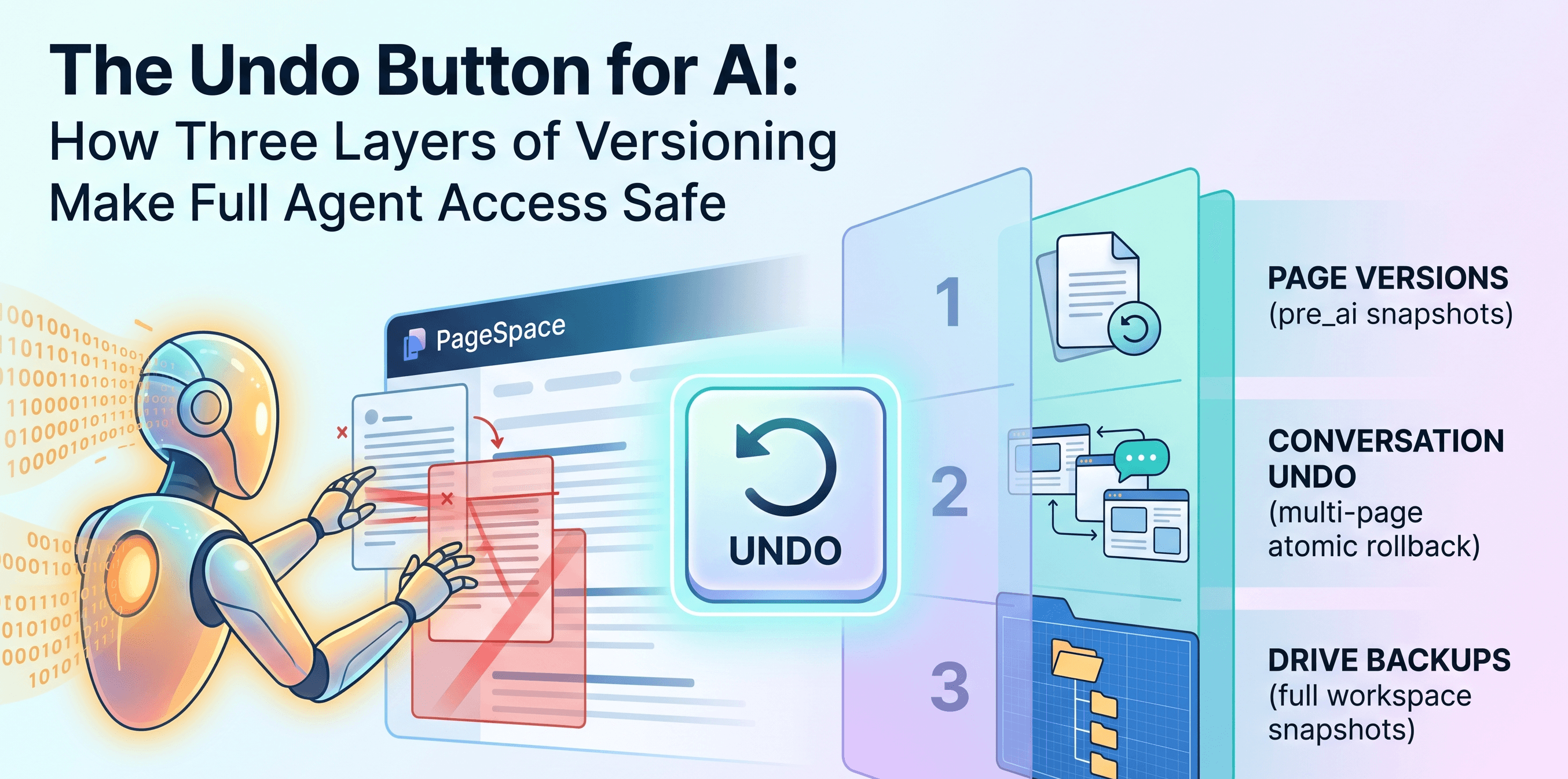
To make AI actions truly reversible, you need versioning that understands three things:
- What changed on each individual page — so you can restore a single page without affecting everything else
- What the AI did across an entire conversation — so you can undo a multi-page operation as one atomic action
- What your entire workspace looked like at a point in time — so you can recover from anything, no matter how many changes were made
PageSpace builds all three.
Layer 1: Page Versions — The Automatic Snapshot
Every time a page is modified in PageSpace, a version is created. This happens whether a human or an AI made the change. But here's the detail that matters for AI safety: the system tags versions differently depending on who initiated the edit.
When a human edits a page, the version source is tagged as auto. When an AI agent edits a page, the version source is tagged as pre_ai.
This isn't a label for display purposes. It's a first-class concept in the database schema — a dedicated enum value that the entire versioning system understands. The system knows, at the data level, that this version exists because an AI was about to change something.
Why does this matter? Because when you're looking at a page's version history, you can see exactly where the AI intervened. You can see the state of the page immediately before the AI touched it. And you can restore to that exact point with one click.
Each version captures:
- The full page content — stored with a SHA-256 content reference, optionally compressed for large pages
- The content format — whether it's rich text, markdown, JSON, or raw HTML
- A state hash — a computed fingerprint of the page's complete state (title, content, position, settings), so the system can detect if the page has been modified since the version was created
- The page revision number — a monotonically increasing counter that detects concurrent edits
Versions are retained for 30 days by default. If a version is important — say, it's the last known-good state before a major AI-driven rewrite — you can pin it, and it's exempt from expiration.
This isn't "undo" in the Ctrl+Z sense. It's a complete, content-addressable snapshot of every page state, with AI changes explicitly marked as a distinct source.
Layer 2: Conversation Undo — Reversing What the AI Did
Page versions let you restore individual pages. But AI agents don't just edit one page at a time.
In a single conversation, an AI agent in PageSpace might create a new document, edit an existing one, update a spreadsheet, rename a page, and move something into a different folder. Each of those actions creates its own page version and activity log entry. But from the user's perspective, those five changes were one thing: "the AI did what I asked."
If the result isn't what you wanted, you don't want to manually find and revert five separate page versions. You want to undo everything the AI did from that point forward.
That's what conversation undo does.
When you trigger an undo on any message in a PageSpace AI conversation, the system finds every change that the AI made at or after that message. It traces the connection through the conversation ID that's stamped on every activity log entry — every page create, update, delete, rename, and move that the AI performed during that conversation.
You get two options:
Messages only — Remove the conversation messages from that point forward (soft-delete, not permanent destruction). The AI's changes to pages stay in place. Use this when the AI said something unhelpful but the actual edits were fine.
Messages and changes — Remove the messages AND roll back every change the AI made to your workspace. Every page edit reverted. Every page creation undone. Every rename reversed. All of it, atomically, in a single database transaction.
Before any of this executes, you get a preview. The system shows you exactly how many messages will be removed, exactly which pages and activities will be affected, and whether any of those pages have been modified since the AI touched them (conflict detection). If someone else — or you — made additional edits on top of the AI's changes, the system warns you. You can force the rollback if you want, but you'll know what you're overriding.
This isn't just "go back to a previous version." This is "identify every side effect of a multi-step AI operation and reverse all of them as one unit."
Layer 3: Drive Backups — The Full Workspace Snapshot
Pages and conversations are fine-grained. But sometimes you need the nuclear option.
Maybe you handed an AI agent a broad instruction and it reorganized half your workspace. Maybe you're about to let a new AI agent loose on your knowledge base and you want a checkpoint first. Maybe it's Tuesday and you just want a backup.
Drive backups capture everything:
- Every page in the workspace — including content, metadata, and tree position (you can optionally include trashed pages too)
- All permissions — who has access to what, at what level
- All members and their roles — the full team structure
- All files — attachments, uploads, everything stored in the drive
Backups can be created manually (click a button), on a schedule (automated), or automatically before a restore operation (so restoring from a backup doesn't destroy your current state — the system snapshots what you have before overwriting it).
Each backup records page count, total content size, custom labels, and an optional reason field. You can annotate your backups: "Before letting the new research agent run" or "Pre-migration checkpoint."
This is the "I don't know exactly what went wrong but I need to get back to last Thursday" layer.
The Audit Trail — Knowing Exactly What Happened
Versioning lets you go back. The audit trail lets you understand what happened in the first place.
Every action an AI takes in PageSpace is logged with full attribution:
- Which AI provider and model performed the action (not just "AI did this" — you know it was Claude 3.5 Sonnet, or GPT-4, or whatever model you're using)
- Which conversation the action was part of — linking the change back to the exact chat where you gave the instruction
- What changed — previous values and new values for every modified field
- State hashes before and after — cryptographic proof of what the page looked like before and after the change
- The agent chain — if a sub-agent was involved (one AI agent delegating to another), the full chain of delegation is recorded
This matters for teams. When three people are using AI agents in the same workspace, and someone notices a document looks different, the audit trail tells you which agent changed it, which conversation initiated it, and which user was driving that conversation. No ambiguity. No "the AI did it" with no further details.
Permission Checks Still Apply
A common fear with AI agents is that they'll access things they shouldn't — reading private documents, editing pages in someone else's project, deleting things outside their scope.
In PageSpace, AI agents go through the exact same permission system as human users. Every single tool call — create, edit, delete, rename, move — checks permissions before executing.
If a user doesn't have edit access to a page, their AI agent doesn't either. If a drive is restricted to certain members, an AI agent operating on behalf of a non-member gets denied. There's no backdoor, no elevated privilege, no "the AI needs access so we'll skip the check."
The permission functions are centralized — the same code path that validates a human's edit request validates the AI's. One system. One set of rules. Whether you're clicking a button or the AI is calling a tool, the access check is identical.
Why This Approach Beats the Alternatives
Restricting AI to read-only means you're leaving most of the value on the table. An AI that can't actually do things for you is an expensive search box. You still write every document, organize every folder, update every spreadsheet yourself. The AI watches.
Giving AI full access with no safety net works until it doesn't. And when it doesn't, the cost is high — lost content, broken organization, hours of manual recovery. The more powerful the AI, the more damage a single bad instruction can cause. "Just be careful with your prompts" is not a safety strategy.
Making AI actions reversible at every level is the approach that lets you actually use AI for real work without anxiety. You don't need to craft the perfect prompt. You don't need to review every change before it's made. You give the AI an instruction, see what it does, and if the result isn't right, you roll it back — one page, one conversation, or the entire workspace.
The safety isn't in preventing the AI from acting. It's in making every action undoable.
What This Looks Like in Practice
You're working on a product launch. You ask your AI agent to draft documentation for three new features across three separate pages.
The AI creates the pages, writes the content, organizes them under the right folder. Each page gets a pre_ai version snapshot automatically. Every action is logged with the conversation ID, the model used, and the full before/after state.
You review the drafts. Two are great. One completely missed the point.
You have options. You can restore that one page to its pre-AI state using the page version history. Or if the AI also made structural changes you don't like — moved things around, renamed the folder — you can undo the entire conversation, reverting every change the AI made in that session. Or if you realize this after a week of additional work and just want to grab the pre-AI content from that one page, the version is still there, tagged and searchable.
At no point did you lose anything. At no point were you at the mercy of the AI getting it right the first time.
The Uncomfortable Truth About AI Access
Here's what the industry doesn't want to talk about: AI models will make mistakes. They'll misinterpret instructions. They'll take actions you didn't intend. This isn't a bug that will be fixed in the next model release — it's an inherent property of working with systems that interpret natural language.
The question isn't whether your AI will ever do the wrong thing. It's what happens when it does.
If the answer is "you lose your work" or "you spend an hour manually fixing things" — that's a platform problem, not an AI problem. The model will get better over time. But even a perfect model operating on an ambiguous instruction will sometimes produce the wrong result.
The platforms that win won't be the ones with the most powerful AI. They'll be the ones where using powerful AI is safe. Where you can give an AI agent real tools — create, edit, delete, reorganize — and know that no matter what happens, you can get back to where you were.
That's what three layers of versioning gets you. Not a restriction on what AI can do. A guarantee that whatever it does can be undone.